
Although the CCK3 module had never seen a full release, it was still worth upgrading Drupal 6 sites from CCK2 to CCK3, because the latter added a very compelling tool to CCK’s arsenal: Multigroups. This feature allowed users to group several fields together, and enter multiple values into that set of fields as a whole by repeating the field group whenever a new value is added. For instance, let’s suppose your node has an event multigroup containing date and location data. If you were to add a new value to this multigroup, a new set of date and location fields would appear, and you could enter the date and location at once such that they are tied together. This is especially convenient if you need to be able to add a variable number of sets. Otherwise, you could create a certain number of date fields, and then the same number of locations fields, but that is not even convenient.
If you are running a Drupal 6 site with Multigroups, here is an important question to consider: What happens to Multigroup fields when you upgrade to Drupal 7? The answer: They convert to regular fields, and you are left with the fields of the multigroup just lying around, each with multiple values in them, seemingly all unrelated. In the example above, we would be left with two individual fields, a date field with a certain number of values, and a location field with the same number of values. At this point, if we wanted to add new date/location pairs, we would need to add new values to the date field, and then add the corresponding values to the location field in the exact same order so that at least the ordinal number gives a guidance as to which date corresponds to which location. This is certainly unacceptable on a production site.
The Multigroup module does not have a Drupal 7 version, so continuing to use that is not an option after the upgrade. There is a Drupal 7 module that provides a very similar functionality: Field collection. I decided to use this module as a replacement on a recently upgraded site. However, there is obviously no upgrade path to migrate data in between two different modules, neither did I find complete documentation about any feasible way to upgrade on drupal.org. There are two viable options, if you are upgrading from D6, and need to preserve the data: leave Multigroups functionality behind, or manually migrate data to Field collections. As you can guess from the title of the article, the data has been migrated on that particular site that I worked on.
Following is a summary of my experiences migrating Multigroups data from a D6 site to Field collections on D7.
Before I could come up with a migration path, I had to determine how Field collection module works. A brief investigation revealed that the module defines a new entity, called field_collection_item.You attach this entity to the node, and the fields that you wish to put in the field set need to be attached to the newly defined entity. As opposed to this approach, Multigroups provides a type of field group where you can simply group the fields that you wish to act as a set. On the database level in Multigroups, the fields in the set are just regular fields, and the grouping is done by assigning values with the same delta together. Field collection, on the other hand, defines a field type that you add to the node and that links the new entities to the node. The figure below illustrates the storage mechanism for both.
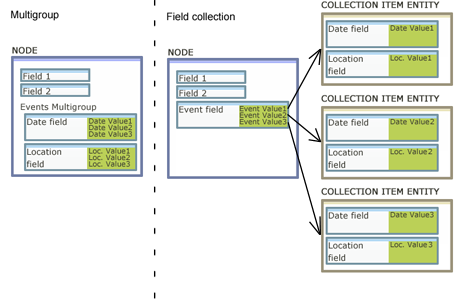
For the sake of example, let’s suppose we have a node that represents an organization that organizes events. In the node, we have a multigroup called Event, and the multigroup has two fields, Date and Location, so that these data can be recorded for the organization’s events. Now that things have become clear, a reasonable path to migrate data from one to the other seems to be the following.
- Add a Field collection field to the node. (Called Event in the example)
- Add the fields to the Field collection field that used to belong to the Multigroup. (Date and Location in the example)
- Assign as many values to the Field collection field as fields in the multigroup used to have. The values in this field would be Field collection entities.
- Take the values from the fields in the multigroup one by one, and spread them across the fields in the Field collection entities.
I put together a piece of code that does this migration; I’ll give a rundown of the code, followed by the actual steps that I took. The algorithm is not fully automatic, so some field data will need to be manually inserted into it. First, let’s start by defining some variables for later use.
  $content_type = 'my_content_type';
  $collection_field = 'field_event_collection';
  // List all the fields that are in the multigroup
  $multigroup_fields = array(
    'field_date',
    'field_location',
  );
We need a list of nids of the nodes that have value in the multigroup. I used the data in the first field’s table, which should yield the same result as the data of other fields in the multigroup, since, theoretically, when we assign values to the multigroup, we assign values to all the fields in it at once.
  // Get all the nodes that have value in the multigroup.
  $query = db_select('field_data_' . $multigroup_fields[0])
    ->condition('entity_type', 'node')
    ->condition('bundle', content_type);
  $query->addExpression('DISTINCT entity_id', 'nid');
  $query->addExpression('revision_id', 'vid');
  $nodes_result = $query->execute();
The next block iterates through the nodes that were identified in the previous step, and collects data from the fields that used to be in the multigroup. The delta value is used to sort the individual fields’ values. That is, data with delta=0 in one field will be grouped together with data with delta=0 in the other field.
foreach ($nodes_result as $node) {
    // Construct the legacy multigroup for the node from the individual fields.
    $multigroup_data = array();
    foreach ($multigroup_fields as $field) {
      $field_result = db_select('field_data_' . $field, 'field')
        ->fields('field')
        ->condition('entity_type', 'node')
        ->condition('entity_id', $node->nid)
        ->execute();

      foreach ($field_result as $field_item) {
        $multigroup_data[$field_item->delta][$field] = $field_item;
      }

    }
}
The following block does the actual migration. It steps through the multigroups, and creates a Field collection field entry for all of them. Creating a field entry involves adding a row to the field’s table, named field_data_{field_name}, and adding an entry to the field_collection_item table, which is used by Field collection module to keep track of its entities. And finally, the last foreach block updates the tables of the fields in the multigroup so that the fields will be assigned to the corresponding Field collection entity as opposed to the node.
    // Step through the reconstructed multigroups, which will be collections from now.
    foreach ($multigroup_data as $delta => $data) {
      // Create entry in field_collection_item table.
      $id = db_insert('field_collection_item')
        ->fields(array('field_name' => $collection_field))
        ->execute();

      // Attach collection field data to the node.
      db_insert('field_data_' . $collection_field)
        ->fields(array(
          'entity_type' => 'node',
          'bundle' => $content_type,
          'entity_id' => $node->nid,
          'revision_id' => $node->vid,
          'language' => 'und',
          'delta' => $delta,
          $collection_field . '_value' => $id,
        ))
        ->execute();

      // Go through all the fields in the multigroup.
      foreach ($data as $multigroup_field => $field_data) {
        // Reassign the fields in the multigroup from the node to the collection field instance.
        db_update('field_data_' . $multigroup_field)
          ->fields(array(
            'entity_type' => 'field_collection_item',
            'bundle' => $collection_field,
            'entity_id' => $id,
            'revision_id' => $id,
            'delta' => 0,
          ))
          ->condition('entity_type', 'node')
          ->condition('entity_id', $node->nid)
          ->condition('delta', $delta)
          ->execute();

      }
    }
  }
This migration script is not fully automatic, so some manual preparation need to be taken. Below is a list of the steps that I took. My steps assume that the site has been upgraded to D7, and CCK fields have been migrated using Content migrate module.
- In Structure /Content types, go to the Manage Fields section of your content type. Add a new Field collection field. For simplicity’s sake, I used the same name as the Multigroup used to have.
- Under Structure/Field collections, click on Manage Fields near the field you just created.
- Add the fields that your multigroup used to have.
- Update the variable definition in the first section of the code to reflect the names of your content type/fields.
- Run the code. You will need to create a custom module or insert it into an existing one. Defining the function as a submit handler of a simple confirmation form should be fine, but if your database contains a huge amount of data, you might want to consider using Batch API.
- Validate that the fields have migrated. Content in the individual fields should have vanished, and the new collection field should have been populated with data. A simple method to compare the before and after state is opening a browser tab with a node edit form before running the migration script, and opening another tab with the same URL after the script has run. That way, you have a snapshot of that particular node before the process.
- Remove the individual fields that used to be in the multigroup from the content type.
- The fields in the multigroup used to store multiple values - one field stored the values for the repeated field set. After migration, one value is stored per fields. Because of that difference, you now probably have a multi-value field set with multi-value fields. We don’t need that anymore, so the fields in the field set can be set to allow only 1 value. The number of repetitions you wish to allow for the field set can be set in the field collection field’s allowed values setting. Be sure not the set the allowed values to 1 in the field settings when you add the field to the Field collection entity, because that deletes all the existing values in the field’s instances.
Following these steps, I was able to migrate the multigroups to field collections correctly. I did experience a minor issue, which seemed strange to me. After running the script I still saw the old values when I refreshed the node edit page that I had loaded before running the code, and I needed to clear cache to see the migrated values. I did not expect a node edit form to be cached, but other than that, the site performed well afterward.